Data Recovery and Backup: Protecting Your Business from Unexpected IT Failures
Imagine waking up one morning to find that all your business-critical data has disappeared. Financial records, client information, project files, emails — everything is gone. Panic sets in, and you realize the importance of having a robust data recovery and backup strategy. In today’s digital age, businesses can’t afford downtime or data loss, making proper backup systems essential for survival.
Why Data Recovery and Backup is Crucial for Businesses
Data loss can occur due to hardware failures, cyberattacks, human errors, or natural disasters. Without a proper data backup and disaster recovery solution, businesses risk:
- Revenue loss from operational downtime
- Damage to customer trust and brand reputation
- Regulatory penalties for lost or unsecured data
- Increased IT recovery costs
- Permanent loss of critical business information
Companies in Green Bay, Milwaukee, and throughout Wisconsin often turn to local experts such as Computer Repair Services Green Bay or Managed IT Services Green Bay to implement reliable backup and recovery solutions.
Story: How a Small Business Survived a Server Crash
A small accounting firm in Appleton faced a server crash that wiped out several weeks of financial data. Fortunately, they had partnered with a local IT provider offering cloud migration and backup management. Within hours, their systems were restored, downtime was minimized, and client reporting continued without disruption. This real-world scenario highlights the importance of proactive planning and trusted IT partnerships.
How Data Backup Works
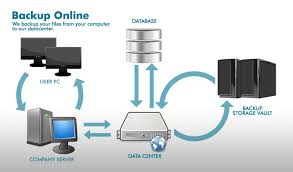
Effective data backup involves regularly copying data from primary systems to secure storage solutions. There are several methods:
- Onsite Backups: Local storage such as NAS devices or dedicated servers for immediate recovery.
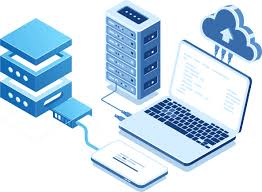
- Cloud Backups: Remote cloud storage ensures redundancy and offsite protection.
- Hybrid Solutions: Combines onsite and cloud backups for maximum reliability.
Businesses often integrate these solutions with professional support services like Software Installation & IT Support and IT Equipment Setup & Removal Services to ensure seamless operation.
Case Study: Manufacturing Company Avoids Disaster
A Wisconsin-based manufacturer experienced a ransomware attack that encrypted its local servers. Thanks to a robust cloud backup solution and disaster recovery plan implemented by local IT specialists, all critical data was restored within 24 hours. This minimized production downtime and prevented significant financial loss. Services like Data Backup & Disaster Recovery are essential safeguards against similar scenarios.
HowTo: Create a Reliable Data Backup and Recovery Plan
Follow these steps to ensure your business is protected:
- Identify critical data and applications that must be backed up.
- Determine the backup frequency and type (full, incremental, differential).
- Select secure backup solutions, including cloud or hybrid options.
- Implement automated backup schedules to reduce human error.
- Test recovery processes regularly to ensure data can be restored quickly.
- Engage professional IT support services for monitoring and maintenance.
Rhumbu LLC services such as Managed IT Services and IT Services and Support can help businesses implement these steps efficiently.
Questions to Ask Your IT Provider
When selecting an IT partner for backup and recovery, consider asking:
- How frequently are backups performed?
- Where is my data stored and how is it secured?
- Can you ensure rapid recovery in case of disaster?
- Do you offer hybrid solutions combining local and cloud backups?
- What monitoring and support services are included?
Next Steps
Securing your business against data loss is critical in today’s digital environment. Contact Rhumbu LLC to design a tailored data recovery and backup solution that keeps your systems safe, compliant, and operational.
Advanced Data Backup Strategies for Modern Businesses
As technology evolves, simple daily backups are no longer sufficient. Modern businesses require robust, multi-layered strategies to ensure continuity. Advanced backup strategies often include:
- Incremental and Differential Backups: Only the data changed since the last backup is saved, reducing storage costs and speeding up recovery.
- Real-Time Replication: Critical systems are mirrored to a secondary location in real-time, providing near-instant disaster recovery capabilities.
- Cloud Redundancy: Cloud-based solutions, such as Cloud Migration Management Services, store data across multiple geographically separated data centers, mitigating the risk of localized failures.
- Encrypted Backups: Protects sensitive information during storage and transmission, crucial for businesses handling financial or personal data.
For small to mid-sized businesses in Green Bay and Milwaukee, local support from Managed IT Services for Small Businesses ensures these strategies are correctly implemented and maintained.
Case Study: Healthcare Provider Safeguards Patient Data
A Milwaukee-based healthcare provider faced stringent HIPAA compliance requirements. By partnering with Rhumbu LLC for a hybrid backup and disaster recovery solution, they implemented encrypted cloud backups combined with local replication. When a hardware failure occurred, all patient records and operational data were restored within hours, ensuring uninterrupted patient care and compliance adherence.
HowTo: Disaster Recovery Testing
Testing your backup and recovery plan is as critical as creating it. A tested plan ensures your business can recover quickly from unexpected incidents. Steps include:
- Simulate a data loss scenario using a non-production environment.
- Initiate recovery procedures to restore data from backup systems.
- Measure recovery time against your business’s acceptable downtime (RTO – Recovery Time Objective).
- Verify data integrity and functionality after restoration.
- Document findings and adjust the backup and recovery plan as needed.
Services like Data Backup & Disaster Recovery Services in Green Bay provide end-to-end testing, monitoring, and maintenance to ensure systems are always ready.
Data Recovery Solutions for Different Scenarios
Data loss can happen in various forms, and understanding the scenario helps in choosing the right recovery solution:
- Accidental Deletion: Recovery from local backups or cloud snapshots can restore files quickly.
- Hardware Failures: Disk failures, RAID degradation, or server crashes may require professional recovery services, such as Computer Repair Services Green Bay.
- Cybersecurity Incidents: Ransomware or malware attacks often demand a combination of forensic recovery and secure backup restoration.
- Natural Disasters: Floods, fires, or power surges highlight the importance of offsite cloud backups with Cloud Migration Management.
Real-World Example: Financial Firm Recovers From Ransomware Attack
A financial advisory firm in Madison, WI, was hit with ransomware that encrypted local servers. Thanks to a multi-layered backup solution implemented by Rhumbu LLC, including real-time replication and secure cloud backups, the firm restored all critical data within 12 hours. This prevented major financial and regulatory consequences.
Best Practices for Maintaining Backup and Recovery Systems
Maintaining backup systems is an ongoing effort. Businesses should follow these best practices:
- Regularly update and patch backup software to protect against vulnerabilities.
- Monitor backup logs and alerts to ensure scheduled backups are completing successfully.
- Rotate physical backup media periodically if onsite solutions are used.
- Conduct annual full recovery drills to test systems and staff readiness.
- Engage professional IT services for continuous monitoring and strategic guidance, such as Managed IT Services Green Bay or IT Services & Support.
Questions for Your IT Partner
When planning backup and recovery, ask your IT provider:
- Do you offer hybrid solutions with both onsite and cloud backups?
- How quickly can you restore data in the event of a disaster?
- Are backups encrypted and compliant with industry regulations?
- Do you provide monitoring, alerting, and maintenance?
- Can you support disaster recovery testing and verification?
Emerging Technologies in Data Recovery and Backup
Modern data recovery and backup solutions are increasingly leveraging advanced technologies to provide faster, more reliable, and intelligent protection. Key innovations include:
- AI-Powered Monitoring: Artificial intelligence monitors backup systems in real time, detects anomalies, and predicts potential failures before they impact operations. Rhumbu LLC integrates these AI tools into their Managed IT Services.
- Automated Cloud Failover: In case of hardware or software failures, automated systems shift workloads to secondary cloud servers, minimizing downtime.
- Virtualization-Based Backup: Virtual machines can be snapshotted and restored rapidly, reducing the impact of system crashes.
- Continuous Data Protection (CDP): CDP ensures that every change in data is captured and stored, providing nearly real-time recovery options.
HowTo: Implementing a Remote Workforce Backup Plan
With the rise of remote work, businesses must ensure that employees’ devices are backed up and recoverable. Steps include:
- Deploy endpoint backup solutions for laptops and mobile devices.
- Utilize cloud storage for automatic file synchronization.
- Encrypt all remote backups to prevent unauthorized access.
- Train staff on proper backup and recovery procedures.
- Monitor compliance and provide support through IT services like IT Services and Support Green Bay.
Case Study: Remote Office Backup Success
A marketing firm with multiple remote teams across Wisconsin partnered with Rhumbu LLC to deploy a hybrid backup system. Cloud storage captured all employee workstations nightly, while onsite servers retained local snapshots. When a laptop was accidentally wiped, the employee’s files were restored within minutes, proving the value of a comprehensive backup strategy.
Compliance Considerations for Data Backup
For industries like healthcare, finance, and government contracting, compliance is critical. Backup systems must satisfy regulations such as HIPAA, GDPR, or federal cybersecurity standards. Rhumbu LLC’s Data Backup & Disaster Recovery Services ensure regulatory compliance while maintaining system availability.
HowTo: Test Your Backup Compliance
Steps to verify your backup systems meet compliance requirements include:
- Review all regulated data to ensure it is included in backup routines.
- Verify encryption and access control measures.
- Conduct simulated recovery tests and document results.
- Ensure audit trails are maintained for regulatory review.
- Consult with IT experts for ongoing adjustments, such as Managed IT Services Green Bay.
Case Study: Financial Compliance Achieved
A Milwaukee-based financial services company implemented hybrid cloud and onsite backups under strict compliance guidance. When regulators audited their systems, full traceability, encryption, and rapid recovery capabilities demonstrated their adherence to standards, protecting the company from fines and operational setbacks.
Reader Question
Have you ever experienced data loss that could have been prevented with a proper backup and recovery plan? Share your experience with us and see how modern solutions could have helped.
Case Study: Manufacturing Company Recovers From Data Loss
A Green Bay-based manufacturing company suffered a sudden power surge that destroyed multiple local servers. Fortunately, their IT partner, Rhumbu LLC, had implemented a hybrid backup strategy combining onsite and cloud solutions. Within hours, production data was restored, preventing costly downtime and maintaining client trust. This example underscores the critical importance of proactive data recovery and backup services.

HowTo: Create a Data Recovery Playbook
To maximize resilience, businesses should develop a comprehensive data recovery playbook:
- Define critical applications and data, prioritizing them by business impact.
- Document recovery procedures for each scenario (hardware failure, ransomware, accidental deletion).
- Assign responsibilities to IT staff and business leaders.
- Test recovery procedures regularly and adjust as needed.
- Include communication protocols for internal and external stakeholders.
- Partner with professional IT services for ongoing management, such as Managed IT Services Green Bay.
Why Partnering With Local IT Experts Matters
Local IT partners understand the specific challenges faced by Wisconsin businesses. By leveraging services like Computer Repair Services Green Bay and Software Installation & IT Support, companies gain fast response times, personalized strategies, and ongoing monitoring. This hands-on approach minimizes downtime, mitigates risks, and keeps data secure.
Frequently Asked Questions (FAQ)
1. What is the difference between data backup and disaster recovery?
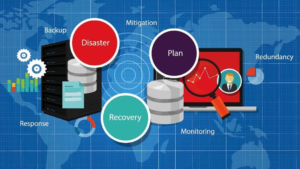
Data backup involves copying and storing data for future restoration, while disaster recovery encompasses a broader plan to restore entire IT systems, applications, and operations after a major incident.
2. How often should businesses back up their data?
Frequency depends on the business’s data volume and criticality. Daily or real-time backups are recommended for most companies, while critical systems may require continuous data protection.
3. Can cloud backups replace onsite backups?
Cloud backups are essential for offsite redundancy, but combining them with onsite backups in a hybrid strategy ensures faster recovery and protection against internet outages.
4. How secure are cloud backups?
Reputable cloud backup services use encryption, multi-factor authentication, and geographically redundant data centers to ensure security and compliance.
5. What industries benefit most from robust backup and recovery plans?
Healthcare, finance, legal, manufacturing, and any business relying heavily on data should prioritize backup and disaster recovery strategies.
Protect your business from the risks of data loss. Partner with Rhumbu LLC to implement a customized data recovery and backup solution that ensures operational continuity, compliance, and peace of mind.
Learn more about best practices for backup and recovery from authoritative sources: