

What Does CMMC Stand For? Computer Repair & IT Compliance Explained | Rhumbu LLC
What Does CMMC Stand For? Why This Question Is Suddenly Critical for Computer Repair and IT Services
What does CMMC stand for? It’s a question that used to live quietly inside government contracting circles. Now, it’s showing up in conversations between business owners, IT managers, and even companies simply looking for reliable computer repair. And the reason is simple: cybersecurity compliance is no longer optional, and CMMC has become one of the most important frameworks shaping how businesses protect data, fix systems, and choose IT partners.
If you run a business that relies on computers, networks, or cloud systems—and especially if you work with sensitive data—this page was built for you. Whether you’re searching because you’ve heard the acronym tossed around or because compliance pressure is already knocking, you’re about to understand not just what CMMC stands for, but why it matters deeply to computer repair, managed IT services, and long-term business survival.

The Moment CMMC Stopped Being “Someone Else’s Problem”
For years, cybersecurity frameworks felt distant to most small and mid-sized businesses. Compliance sounded like something meant for massive defense contractors or federal agencies. But that illusion collapsed the moment ransomware attacks, data breaches, and supply-chain hacks started hitting everyday companies—law firms, manufacturers, clinics, retailers, and local service providers.
Today, when a hard drive fails, a server crashes, or malware slips past outdated defenses, the conversation is no longer just about “fixing the computer.” It’s about whether data was exposed, whether regulations were violated, and whether the business can prove it took reasonable steps to protect sensitive information.
This is where understanding what CMMC stands for becomes critical—and where computer repair and IT services intersect with compliance in a way they never did before.
So, What Does CMMC Stand For—And Why Is It So Important?
CMMC stands for Cybersecurity Maturity Model Certification. At its core, it’s a structured framework designed to ensure organizations implement proper cybersecurity practices to protect sensitive data.
While CMMC originated within the Department of Defense ecosystem, its influence has spread far beyond federal contracting. The framework represents a broader shift in how cybersecurity is evaluated: not by promises or checklists alone, but by proven, measurable maturity.
In practical terms, CMMC evaluates how well a business protects systems, controls access, monitors threats, recovers from incidents, and maintains accountability across its IT environment. That includes everything from endpoint protection and backups to patching, access controls, and incident response.
This is exactly why modern computer repair is no longer just about replacing parts or reinstalling operating systems. A single “quick fix” performed without security awareness can create compliance failures, expose data, or introduce long-term risk.
Why Computer Repair and CMMC Are Now Closely Linked
Many business owners still separate “computer repair” from “cybersecurity.” But in today’s environment, that separation doesn’t exist. Every repair action touches data, access controls, and system integrity.
For example, when a technician repairs a workstation, resets credentials, or migrates files, they are directly interacting with the security posture of the business. Improper handling can violate best practices outlined in frameworks like CMMC, while proper handling can actively strengthen compliance.
This is why businesses increasingly turn to professional providers instead of ad-hoc fixes. Companies that rely on experienced teams offering professional computer repair services gain more than hardware support—they gain processes aligned with modern cybersecurity expectations.
A Real-World Story: When “Just Fix the Computer” Wasn’t Enough
A Midwest manufacturing company once called for emergency computer repair after several systems locked up overnight. At first glance, it looked like a routine malware issue. A less experienced provider might have wiped the machines, restored files, and moved on.
But a deeper review revealed something far more serious. The attack exploited unpatched systems, accessed shared credentials, and touched folders containing sensitive operational data. While the computers were repairable, the company suddenly faced uncomfortable questions: Was data accessed? Was it reported? Were safeguards documented?
This incident changed how leadership viewed IT support. They realized that repair without structure is risk. Repair without accountability is liability. That moment marked their shift toward managed services and compliance-aware IT operations—an approach Rhumbu LLC specializes in through its managed IT services.
Who Needs to Care About What CMMC Stands For?
If you think CMMC only applies to defense contractors, you’re missing the bigger picture. Any business that touches sensitive data—customer records, financial information, intellectual property, or regulated data—needs to understand how cybersecurity maturity is measured.
This includes small businesses relying on outsourced IT support, companies scaling rapidly, and organizations that depend on reliable systems to operate daily. Even businesses that primarily seek help for repairs or troubleshooting benefit from aligning with providers who understand modern compliance expectations.
It’s no coincidence that companies researching CMMC often also search for answers like is it worth it to repair a computer. The decision is no longer just financial—it’s strategic.
Why Compliance Awareness Starts at the Repair Level
CMMC emphasizes repeatable, documented, and secure processes. That mindset starts at the lowest technical level. A repaired system must be patched correctly. Access must be restored securely. Backups must be validated. Logs must be protected.
When these steps are ignored, businesses unknowingly weaken their cybersecurity maturity. When they are followed consistently, businesses move closer to compliance readiness—even if certification isn’t their immediate goal.
This is why Rhumbu LLC approaches every repair, installation, and support request through a broader lens. Services like on-site IT support and structured service workflows help businesses stay resilient, secure, and prepared.
A Question Every Business Owner Should Ask
When something breaks in your IT environment, do you want it fixed quickly—or fixed correctly in a way that protects your business long-term?
The answer to that question often determines whether a business simply survives technical issues or builds a foundation of trust, security, and scalability.
What Comes Next: Understanding CMMC Beyond the Acronym
Now that you understand what CMMC stands for and why it matters, the next step is going deeper. In the next section, we’ll explore how CMMC fits into everyday IT decisions, how it compares to traditional cybersecurity approaches, and why businesses increasingly pair compliance awareness with proactive IT services instead of reactive fixes.
This is where the real competitive advantage begins.
How CMMC Changes the Way Businesses Think About IT Support and Computer Repair
Once you understand what CMMC stands for, the next realization is often uncomfortable: many traditional approaches to IT support and computer repair simply aren’t enough anymore. The Cybersecurity Maturity Model Certification didn’t introduce new risks—it exposed the ones businesses had been living with for years.
In a CMMC-aware environment, every IT decision becomes intentional. Repairs aren’t isolated actions. Updates aren’t optional. Documentation isn’t an afterthought. Instead, everything ties back to one central question: does this action strengthen or weaken our cybersecurity maturity?
This shift is why businesses are re-evaluating who they trust with their systems. It’s no longer about who can fix a broken laptop the fastest. It’s about who understands how that fix impacts the entire IT ecosystem.
The Difference Between Fixing a Computer and Protecting a Business
At surface level, computer repair seems straightforward. Something breaks, it gets fixed. But CMMC forces businesses to look beneath the surface and ask harder questions.
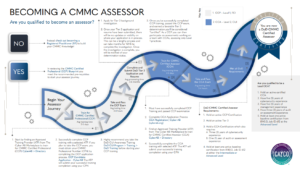
Was the system fully patched before returning it to production? Were security settings restored correctly? Were passwords rotated or reused? Was sensitive data accessed during the repair process?
Each of these questions maps directly to cybersecurity controls that CMMC evaluates. When those controls are ignored, businesses accumulate risk. When they’re addressed consistently, businesses build maturity.
This is why many organizations move beyond break-fix models and explore structured approaches like managed IT services. Managed services turn reactive fixes into proactive safeguards.
Why Small Businesses Are No Longer Invisible
One of the biggest misconceptions about CMMC is that it only affects large enterprises. In reality, small businesses are often the most vulnerable—and therefore the most scrutinized.
Attackers target smaller organizations precisely because they expect weaker defenses. And regulators increasingly recognize that sensitive data doesn’t just live in enterprise data centers. It lives on laptops, desktops, point-of-sale systems, and cloud platforms used by everyday businesses.
This is why topics like common IT problems faced by local businesses are no longer just operational concerns—they’re security risks with compliance implications.
What CMMC Reveals About Legacy IT Practices
Many IT environments grew organically over time. A computer here, a server there, software added as needed. While this approach worked in the past, it often results in inconsistent security controls.
CMMC exposes these inconsistencies. It highlights missing documentation, outdated systems, and informal practices that no longer meet modern expectations. Suddenly, “we’ve always done it this way” becomes a liability.
This realization pushes businesses toward modernization. Services like professional software installation and support ensure systems are configured securely from the start instead of patched together over time.
How CMMC Influences Everyday IT Decisions
Once a business becomes aware of CMMC, even routine decisions change. Choosing when to replace a computer, how to manage user access, or where to store data suddenly carries strategic weight.

For example, deciding whether to repair or replace aging hardware isn’t just about cost. It’s about whether that system can support modern security standards. Many business owners explore cost considerations through resources like PC repair cost guides, but CMMC adds a new layer to the decision.
If a system can’t be secured properly, repairing it may actually increase long-term risk.
The Role of Documentation in Cybersecurity Maturity
One of the most overlooked aspects of CMMC is documentation. It’s not enough to do the right thing—you must be able to prove it.
That means documenting repairs, changes, updates, and access controls. For many businesses, this represents a cultural shift. IT work moves from informal problem-solving to structured, repeatable processes.
Providers offering professional IT services and support understand this shift and build documentation into their workflows, reducing stress and increasing accountability.
Why Outsourcing IT Becomes More Attractive Under CMMC
As cybersecurity expectations rise, many businesses realize they don’t have the internal resources to manage everything effectively. This leads them to explore outsourcing—not as a cost-cutting measure, but as a risk-management strategy.
Articles discussing the benefits of outsourcing IT support highlight how external teams bring expertise, structure, and consistency that internal teams often struggle to maintain.
In a CMMC context, outsourcing can mean the difference between ad-hoc fixes and disciplined, security-first operations.
Where Computer Repair Fits Into a CMMC-Aligned Strategy
Computer repair doesn’t disappear in a compliance-driven world—it evolves. Repairs become part of a larger lifecycle that includes monitoring, patching, backup, and recovery.
This is why repair services are increasingly paired with offerings like data backup and disaster recovery. A repaired system without reliable backups is still a liability.
CMMC encourages businesses to think holistically. It rewards environments where systems are not only functional but resilient.
How This Shift Impacts Business Trust and Reputation
Customers, partners, and vendors are becoming more aware of cybersecurity risks. Businesses that can demonstrate mature IT practices gain a competitive advantage.
Understanding what CMMC stands for—and aligning operations accordingly—signals professionalism, responsibility, and foresight. It reassures stakeholders that their data is handled with care.
In contrast, businesses that treat IT as an afterthought may find trust eroding over time.
Preparing for What Comes Next
In the next section, we’ll explore the deeper structure behind CMMC, including maturity levels, real-world implications for businesses that never planned to deal with compliance, and how proactive IT strategies reduce friction instead of creating it.
By the end, you’ll see why CMMC isn’t just a compliance framework—it’s a blueprint for modern, resilient IT operations.
.
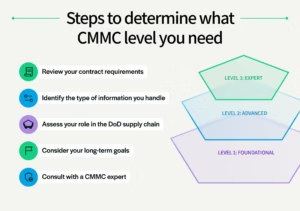
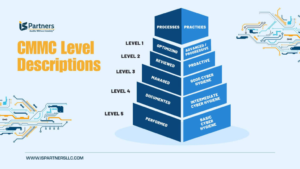
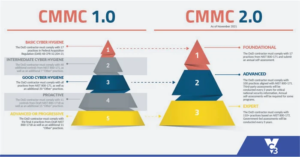
Breaking Down CMMC Levels: What Cybersecurity Maturity Really Looks Like
Once businesses move past asking what CMMC stands for, the next question naturally follows: how does it actually work? CMMC is structured around maturity levels, each designed to measure how well an organization protects systems and data over time.
These levels are not about perfection. They’re about progression. Each stage reflects a deeper commitment to cybersecurity discipline, repeatability, and accountability. And while certification itself may not apply to every business, the maturity concepts behind CMMC apply to nearly all modern IT environments.

At the most basic level, organizations focus on fundamental cyber hygiene—patching systems, controlling access, and protecting devices. As maturity increases, practices become more structured, documented, and proactive.
This progression mirrors what many businesses experience naturally as they grow. What starts as occasional computer repair evolves into standardized IT processes and eventually into fully managed environments.
Why CMMC Levels Matter Even If You’re Not Seeking Certification
A common mistake is assuming that CMMC only matters if certification is required. In reality, the framework highlights risks that exist regardless of regulatory obligations.
Unpatched systems, weak access controls, inconsistent backups, and undocumented processes are vulnerabilities no matter who you serve. CMMC simply shines a light on them.
This is why many businesses begin exploring structured guidance through resources like managed IT services explained. Even without formal certification, adopting maturity-based practices reduces downtime, improves recovery, and lowers long-term costs.
How Computer Repair Fits Into CMMC Maturity Levels
At lower maturity levels, computer repair is often reactive. A system fails, it gets fixed, and operations resume. But higher maturity requires consistency and foresight.
Repairs must follow documented procedures. Systems must be restored to secure configurations. Credentials must be protected. Changes must be tracked.
This is where the line between repair and IT strategy disappears. Providers offering reliable local IT support help businesses transition from reactive fixes to controlled processes.
The Hidden Cost of Ignoring Cybersecurity Maturity
Many businesses delay improving IT practices because everything appears to be working. But this creates hidden costs that surface at the worst possible time.
Downtime lasts longer. Recovery becomes uncertain. Compliance questions go unanswered. Customer trust erodes.
Articles discussing common IT challenges for small businesses often highlight how technical debt accumulates quietly before causing major disruptions.
CMMC maturity concepts help businesses recognize and address these risks before they escalate.
Where Backup and Recovery Become Non-Negotiable
No discussion of cybersecurity maturity is complete without addressing backup and recovery. CMMC emphasizes resilience—the ability to restore operations quickly and securely after an incident.
A repaired system that cannot be restored reliably is a liability. Mature environments ensure backups are not only created but tested and protected.
This is why services like data backup and disaster recovery are foundational to compliance-aligned IT strategies.
A Second Story: Learning the Hard Way
A professional services firm once relied on sporadic computer repairs and informal backups. Everything seemed fine—until a ransomware attack encrypted multiple systems simultaneously.
Recovery took weeks. Client deadlines were missed. Trust was damaged.

Afterward, leadership didn’t just invest in better security tools—they changed how IT was managed entirely. Repairs became structured. Access controls were formalized. Backups were tested regularly.
They never pursued CMMC certification, but they unknowingly aligned with its maturity principles. The result was a stronger, more resilient operation.
Why Managed Services Align Naturally With CMMC Principles
CMMC rewards consistency. Managed services are built around it.
Instead of reacting to problems, managed environments monitor systems continuously, apply updates proactively, and document changes automatically.
Businesses exploring options like managed IT services for small businesses often find that maturity-based frameworks finally make sense of what good IT should look like.
The Role of Access Control in Everyday IT Operations
One of the most common gaps exposed by CMMC is access management. Shared credentials, outdated accounts, and excessive permissions are widespread problems.
During computer repair or onboarding, access is often granted quickly but rarely reviewed later. Over time, this creates unnecessary exposure.
Structured IT support ensures access aligns with roles, responsibilities, and security policies—an expectation deeply embedded in CMMC.
Why This Matters for Business Growth
As businesses grow, so does scrutiny. Clients, partners, and vendors increasingly expect proof of cybersecurity responsibility.
Understanding what CMMC stands for—and applying its principles—positions businesses as trustworthy, reliable partners.
In the next and final section, we’ll bring everything together. You’ll see how CMMC awareness, computer repair, and modern IT services converge into a single strategy—and how businesses can take the next step confidently.
How Businesses Can Apply CMMC Principles Without Becoming Overwhelmed
By now, the question of what CMMC stands for has evolved into something far more practical: how do you actually apply these principles without turning your business upside down? The answer is simpler than most people expect. CMMC is not about perfection. It’s about maturity, consistency, and intention.
Businesses that succeed don’t overhaul everything overnight. They start by stabilizing systems, documenting what already exists, and building repeatable processes around everyday IT tasks. Computer repair, software updates, backups, and access control become standardized instead of improvised.
This approach reduces stress rather than adding it. Instead of scrambling during incidents, teams know exactly what to do, how to recover, and how to prove it.
Why Computer Repair Is the First Step Toward Cybersecurity Maturity
Every IT journey starts somewhere. For many businesses, that starting point is computer repair. A slow system, a failed hard drive, or a malware infection creates urgency—and opportunity.
Handled correctly, a repair becomes a chance to secure the system properly, document changes, and align configurations with modern standards. Handled poorly, it becomes another patch on an already fragile environment.
Businesses that rely on experienced providers for computer repair in Green Bay benefit from a security-aware approach that treats every fix as part of a larger strategy.
Where Many Businesses Go Wrong
The biggest mistake companies make is treating compliance and security as separate from daily operations. They invest in tools but ignore process. They fix problems but don’t document them. They restore systems but don’t test recovery.
CMMC exposes these gaps. It rewards organizations that embed security into routine work instead of bolting it on afterward.
This is why resources explaining how to define IT services for modern businesses are becoming increasingly relevant. Clarity leads to consistency.
The Role of IT Services in Long-Term Resilience
As environments grow more complex, internal teams often struggle to keep up. Outsourced IT services provide structure, accountability, and expertise that scale with the business.
From structured onboarding to proactive maintenance, providers offering professional IT services help organizations align with maturity-based frameworks naturally, without drowning in jargon.
Instead of reacting to problems, businesses gain visibility, predictability, and control.
Frequently Asked Questions About CMMC and Computer Repair
What does CMMC stand for?
CMMC stands for Cybersecurity Maturity Model Certification. It’s a framework designed to assess and improve how organizations protect sensitive information through structured cybersecurity practices.
Does CMMC apply to small businesses?
While certification requirements may not apply to all small businesses, the principles behind CMMC are relevant to any organization that relies on computers, networks, or sensitive data.
How does computer repair relate to CMMC?
Computer repair directly impacts system security. Repairs performed without security awareness can weaken defenses, while structured, documented repairs support cybersecurity maturity.
Is managed IT required for CMMC?
Managed IT services are not required, but they align closely with CMMC principles by providing consistency, documentation, and proactive security management.
What’s the biggest risk of ignoring cybersecurity maturity?
The biggest risk is exposure—longer downtime, data loss, regulatory issues, and loss of trust from customers and partners.
A Final Question for Business Owners
If your systems were tested tomorrow—by failure, by audit, or by attack—would you be confident in your ability to recover quickly and securely?
If that question creates uncertainty, it’s a sign that maturity—not just repair—is the next step.
Why Rhumbu LLC Is Built for This Moment
Rhumbu LLC doesn’t treat computer repair as an isolated service. Every repair, installation, and support request is approached through a lens of reliability, security, and long-term value.
From everyday troubleshooting to structured managed services, Rhumbu helps businesses move from reactive fixes to resilient operations. Whether you’re exploring compliance concepts like CMMC or simply want your systems to work reliably, the goal is the same: confidence.
Learn more about how Rhumbu supports businesses through managed IT services, or reach out directly to start a conversation about strengthening your IT foundation.
Take the Next Step
Understanding what CMMC stands for is only the beginning. Applying its principles is what protects your business, your data, and your reputation.
If you’re ready to move beyond break-fix IT and toward a structured, security-first approach, connect with Rhumbu LLC today. The right strategy doesn’t just fix problems—it prevents them.